
Partner Approval & Quality Control
Review applications and maintain program quality
Control who promotes your program by reviewing applications and monitoring active partners for quality.
Approval Modes
You set your approval mode during setup. You can change it anytime in Program Settings.
| Mode | How it works |
|---|---|
| Manual review | Every application lands in your queue for review |
| Auto-approve | Partners are approved instantly upon application |
Recommendation: Start with Manual review. You can switch to Auto-approve once you understand what good partners look like for your program.
Reviewing Applications
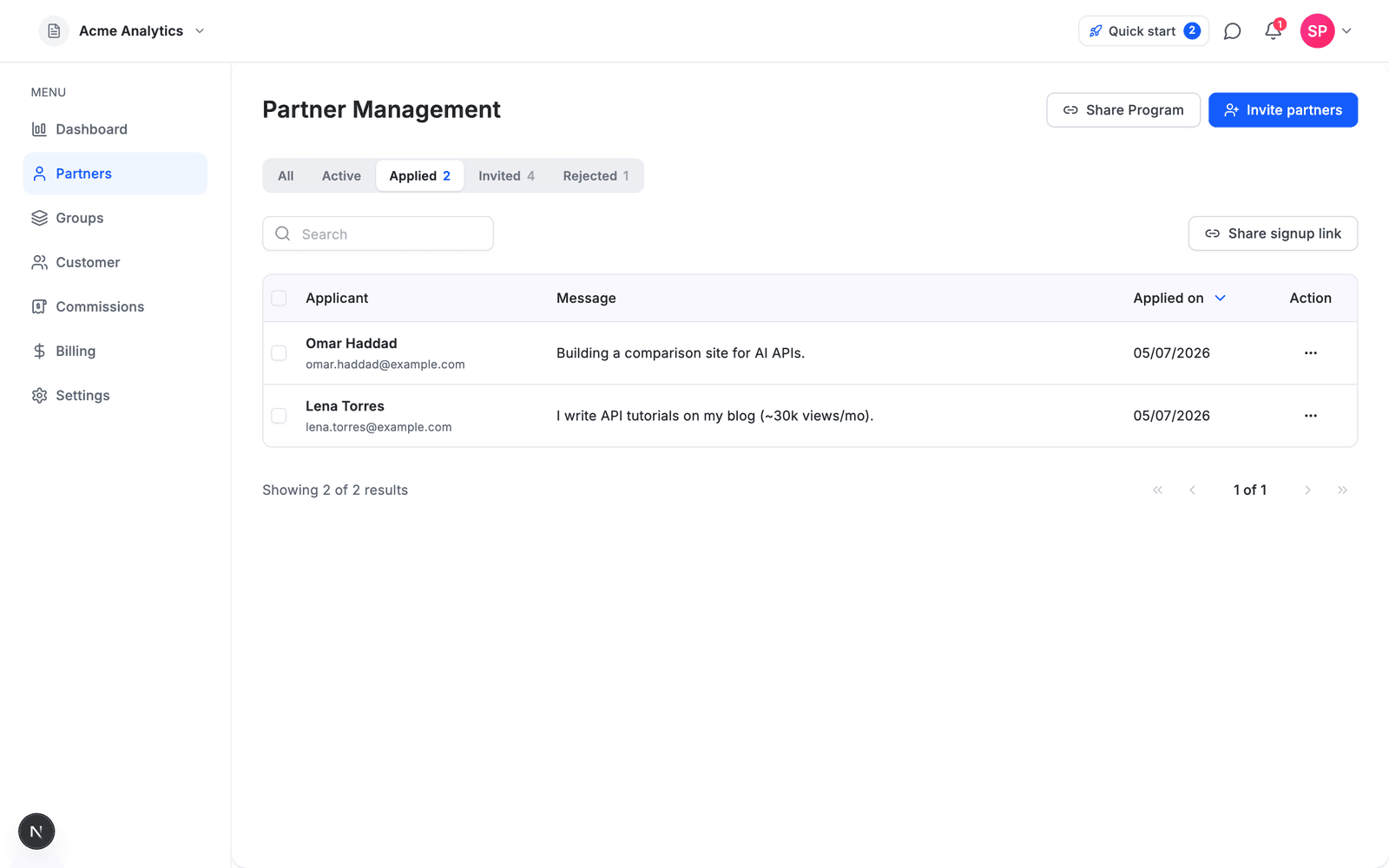
You can review from two places: the Applied tab (full view with the applicant's message, shown above) or directly from the All partners table, where applications float to the top with quick ✓ Approve / ✕ Decline actions on hover.
When a partner applies, you'll see:
- Name & contact info – Who they are
- Website/social profiles – Where they'll promote you
- Audience description – Who they reach
- Promotion method – How they plan to promote (content, ads, email, etc.)
- Message – A short note explaining their interest or fit
What to Look For
Green flags:
- Relevant audience (your target customers)
- Established platform (active blog, YouTube channel, newsletter)
- Clear promotion plan
- Professional communication
Red flags:
- No website or social presence
- Audience mismatch (e.g., gaming audience for B2B software)
- Vague or generic responses
- History of spam or policy violations
Approving or Rejecting
From the Applications tab:
- Click on a pending application
- Review their details
- Choose Approve or Reject
When you approve: The partner gains access to their dashboard, tracking links, and marketing materials.
When you reject: The partner is notified their application was declined.
Tip: If you're unsure, approve them. You can always remove partners later if they don't perform or violate your terms.
Managing Active Partners
Partner Metrics
Track partner quality from your dashboard:
| Metric | What it tells you |
|---|---|
| Clicks | Traffic volume from partner's links |
| Signups | Leads generated |
| Paid customers | Conversions |
| Revenue | Total sales attributed to partner |
| Conversion rate | Quality of traffic (signups → paid) |
Removing a Partner
The dashboard does not have a self-serve action to remove a partner from your program yet. If a partner violates your terms, contact support with the partner and program details.
Warning Signs
Watch for these red flags in active partners:
- High clicks, zero conversions – May indicate low-quality traffic or fraud
- Refund rate above normal – Could be misleading promotion
- Brand misuse – Unauthorized use of your logo or false claims
Best Practices
- Respond quickly – Partners expect approval within 24-48 hours
- Set clear terms – Define what's allowed in your Terms of Service
- Communicate expectations – Let partners know what success looks like
- Review periodically – Check partner quality monthly, not just at signup
Coming Soon
- Blocklist – Automatically reject applications from specific domains