
Define Commission
Set up commission rates and structures for your affiliate program
Commission determines what partners earn when they drive results. Configure the right type and duration to attract quality partners and align incentives with your business model.
Commission Basics
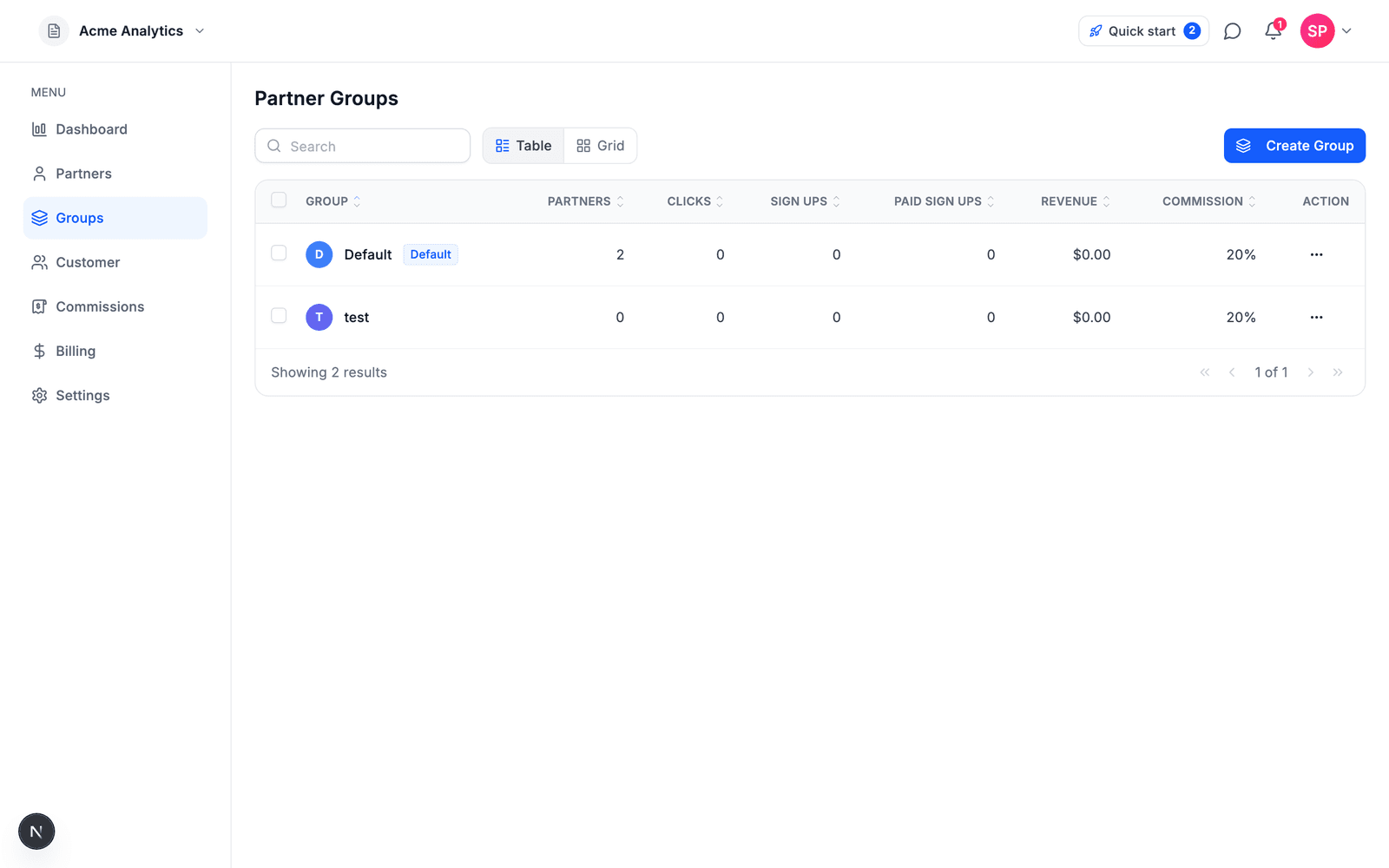
Commission is set per partner group: every partner belongs to a group (Default, unless you assign another), and the group's policy decides what they earn. That's how you run VIP tiers next to a standard rate without per-partner bookkeeping.
Every commission has two components:
| Component | Description |
|---|---|
| Rate | How much partners earn (percentage or fixed amount) |
| Duration | How long partners earn from a referred customer |
Commission Types
Revenue Share
Partners earn a percentage of each sale from customers they refer.
Example: 30% commission means partner earns $30 on a $100 sale.
Revenue Share is the default and recommended type for SaaS products.
CPC (Cost per Click)
Partners earn a fixed amount for each click they drive.
Example: $0.01 per click.
CPL (Cost per Lead)
Partners earn a fixed amount for each qualified lead (signup) they refer.
Example: $10 per lead.
CPS (Cost per Sale)
Partners earn a percentage of each sale they generate — the same calculation as Revenue Share. CPS is always a percentage of the sale amount; there is no fixed-amount-per-sale option.
Example: 20% on a $100 sale = $20.
Coming Soon
| Type | Description | Example |
|---|---|---|
| Tiered | Bonuses at milestones | $100 bonus after $100K revenue |
| Hybrid | Combine multiple types | CPC + CPS + milestone bonuses |
Commission Duration
How long partners continue earning from a referred customer:
| Duration | Description | Best for |
|---|---|---|
| One-time | First payment only | Simple products, one-time purchases |
| 3 months | First 3 months of payments | Short trial periods |
| 6 months | First 6 months of payments | Medium commitment products |
| 12 months | First 12 months of payments | Annual subscription products |
| Lifetime | All future payments | Maximum partner incentive |
| Custom | Configure your own duration | Specific business needs |
Recommendation: For SaaS, use 12 months or lifetime to motivate partners to refer customers who stay, not just customers who sign up.
Setting Your Commission
During Setup
In the setup wizard, you'll configure:
- Commission Rate (%) – e.g., 30%
- Commission Duration – e.g., 12 months
This becomes your default commission for all partners.
Example Configurations
| Business Type | Rate | Duration | Why |
|---|---|---|---|
| B2B SaaS ($50-200/mo) | 30% | 12 months | High LTV justifies generous commission |
| B2B SaaS ($500+/mo) | 20-25% | Lifetime | Lower % but longer duration |
| Consumer SaaS ($10-30/mo) | 30-40% | 6 months | Higher % to attract volume partners |
| One-time purchase | 20-30% | One-time | Simple, predictable |
Commission Calculation
Formula: Commission = Sale Amount × Commission Rate
Example with 30% commission:
| Customer Payment | Partner Earns |
|---|---|
| $100 one-time | $30 |
| $100/month × 12 months | $30/month × 12 = $360 total |
| $1,000/year lifetime | $300/year ongoing |
With Affitor's platform fee: $0 until your program has earned its first $10,000 through affiliates, then 3.5% of each affiliate-driven sale. The free tier is counted per program.
| Sale | Partner Commission (30%) | Platform Fee | You Keep |
|---|---|---|---|
| $100, program still under $10,000 | $30 | $0 | $70* |
| $100, program past $10,000 | $30 | $3.50 (3.5%) | $66.50* |
*Before your own payment processing fees (for example Stripe's ~2.9% + $0.30)
Changing Commission Rates
You can update your default commission anytime in Program Settings.
Important: A change does not rewrite commissions that already exist, but it does apply to every new commission from the date it takes effect — including recurring payments from customers referred before the change. Lowering the rate lowers what partners earn on their existing subscribers' future renewals.
If you lengthen the duration, payments that earned nothing under the old duration (because it had run out) can be credited retroactively at the new policy. Those backpaid commissions go through the hold period again and carry the platform fee, so they appear on a later invoice.
Different Rates for Different Partners
Use partner groups to give different partner segments different commission rates — for example, a higher rate for top performers or a separate rate for agencies. Each group carries its own commission policy, and every partner belongs to exactly one group.
Best Practices
-
Be competitive – Research what similar products offer. For AI SaaS, 30%+ is common.
-
Think lifetime value – A 30% commission on a customer with 24-month LTV is very profitable for you.
-
Longer duration = better partners – Lifetime commissions attract partners who promote quality, not just volume.
-
Start generous, optimize later – Reducing rates for new partners is easier than raising them after expectations are set.
Verify it worked
- Groups shows your group with the new rate in the Commission column
- Test-mode sales (
additional_data: { test_mode: true }) create no commission. Run verification (see Testing Integration) checks that a click, lead and sale attribute end to end; its test commission is kept out of Commissions and partner earnings, so the rate itself shows on the first live sale
- Partners inherit the policy of the group they are IN — check the partner's group on the Partners table before assuming the rate is wrong
What's Next
- Commission Approval & Cash Flow – How commissions are validated and paid
- Payouts – Partner payout schedules and methods